HS连携
遇到的问题
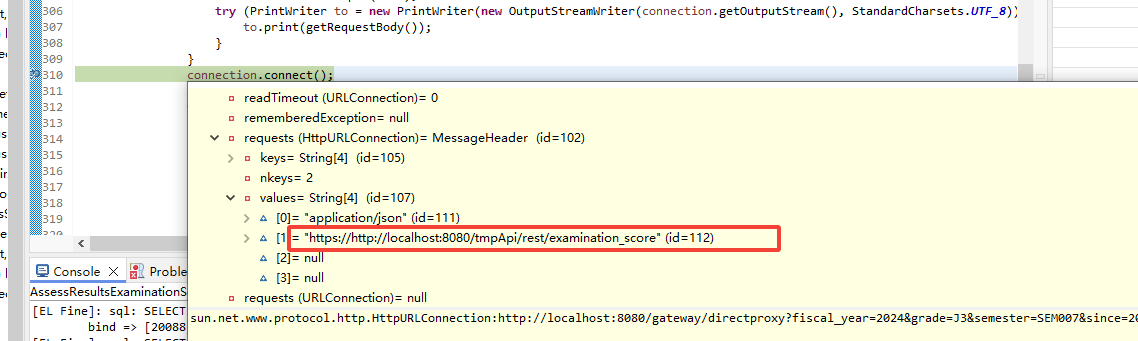
- 学習系システムとの通信に失敗しました。
http://localhost:8080/gateway/directproxy?fiscal_year=2024&grade=J3&semester=SEM007&since=2024-11-01&until=2025-03-31&exam_subject_name=評価項目1&subject_id=J010&viewpoint_index=1&updatetime=2024-11-07&temp_school_id=AAAA- 原因:调用 gateway 工程时,发生了 500 错误
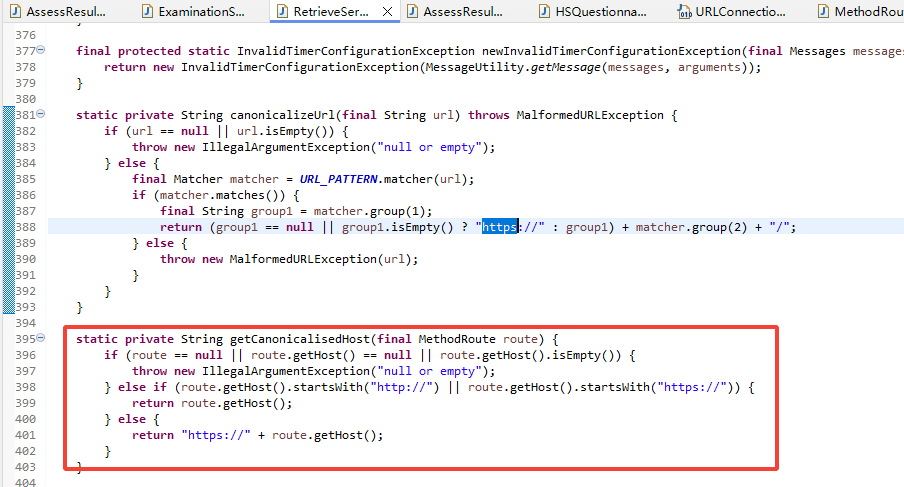
- 解决方法:RetrieveServiceBase.getCanonicalisedHost 方法解析 gatewayProxyConfiguration.xml 中配置的 host 时,出问题了。重新修改了下 gatewayProxyConfiguration.xml 中的 host 地址。

- 单体测试时,需要把 AssessResultsStudentInfoLogContext.build 方法中的 validate 去掉。不然会断言错误。
Code 加密
- http://localhost:8080/educom/rest/smartschool/observation_record_coordination?temp_school_id=AA&transaction_no=0&max_counts=10
- 功能:C4th いいとこみつけ情報連携
- 画面数据:
- いいとこみつけ机能
- HS 承认
- 接口返回的数据:(包括了老师和学生的 id 加密)
- 代码(ObservationRecordCoordinationServiceImpl)
データ取得:调用三方接口,开发步骤(不需要 gateway 工程),需配合 timer 管理进行
| 账票名 | 枚举型 | 关联账票 |
|---|---|---|
| 心の天気データ取得 | STUDENT_HEART_WEATHER | |
| H&S 調査票入力内容連携 | QUESTIONNAIRE_INFO | |
| H&S いいとこみつけ情報送信結果返却 | SCHOOL_OBSERVATION_RESULTS_INFO | |
| H&S いいとこみつけ情報取得 | HOME_OBSERVATION_INFO | |
| H&S 連携 H&S 出席簿情報取得 | ABSENCE_INFO | #11796 #14580 |
配置文件
- timerServiceConfiguration.xml
<element>
  <timer>
    <schoolId>C22_shizuoka</schoolId>
    <educomId>1</educomId>
    <type>STUDENT_HEART_WEATHER</type>
    <title>児童生徒心の天気情報取得</title>
    <initial>2023/06/25 8:00</initial>
    <interval>360</interval>
    <arguments>
    <![CDATA[
      <studentHeartWeatherParameter>
        <maxCounts>100</maxCounts>
        <startTime>05:00</startTime>
        <endTime>19:00</endTime>
        <server>
          <restServerId>HS01</restServerId>
          <schoolId>shizuokajh</schoolId>
        </server>
      </studentHeartWeatherParameter>
    ]]>
    </arguments>
  </timer>
</element>
- gatewayProxyConfiguration.xml
<studentHeartWeather label="児童生徒心の天気情報取得">
  <route type="DIRECT" method="GET" host="http://localhost:8080/tmpApi/rest/hs_weather" />
  <restServerId>HS01</restServerId>
</studentHeartWeather>
代码
- tmpApi 项目
- 编写模拟调用的接口
- 编写模拟接口的数据
- v3 项目:
- 与 gatewayProxyConfiguration.xml 相关联的代码:ResouceIdConfiguration.java
红框部分,与代码的变量名保持一致。蓝框部分,取 tempApi 的模拟接口地址。


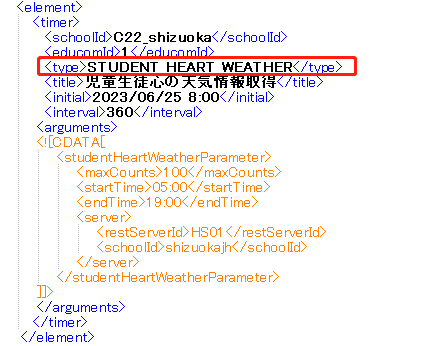
- 与 timerServiceConfiguration.xml 相关联的代码:TimerType.java
红框部分,枚举型的值,与配置文件的 type 保持一致。

- 与 gatewayProxyConfiguration.xml 相关联的代码:ResouceIdConfiguration.java
データ返却:educom 提供 api 接口,开发步骤(需要 gateway 工程)
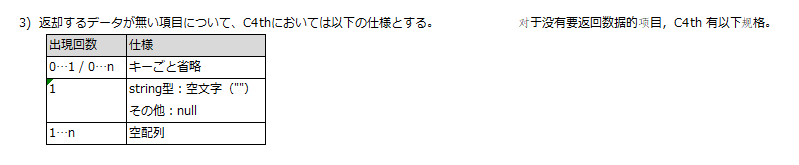
共通式样:
开发手顺:
https://docs.google.com/spreadsheets/d/19lYefLFB8eaYlxMmSYW35YvEGYBx1MFd/edit#gid=1827505463
测试文档:
-
C4th 出席簿登録結果返却
http://localhost:8080/educom/rest/smartschool/hs_rollbook_result?temp_school_id=c131083kasaie&result_no=1&max_counts=10) -
C4th いいとこみつけ情報連携
http://localhost:8080/educom/rest/smartschool/observation_record_coordination?temp_school_id=c131083kasaie&transaction_no=0&max_counts=10 -
学校最新年度返却
http://localhost:8080/educom/rest/smartschool/active_year/c131083kasaie -
C4th 調査票情報登録結果返却
http://localhost:8080/educom/rest/smartschool/questionnaire_results_info?temp_school_id=c131083kasaie&result_no=0&max_counts=10 -
C4th 出席簿情報連携(区分・理由あり)
http://localhost:8080/educom/rest/smartschool/rollbook_info_list?temp_school_id=AA&since=2023-06-25&until=2023-06-25 -
予定表情報連携 API
http://localhost:8080/educom/rest/smartschool/schedule_events_info/AA?since=2023-06-25&until=2023-06-25
v4 データ取得
- 帐票:1901 評価項目取込画面 追加(3.16.03)
调查
结论
- 目前应该没有办法在 v4 中直接调用 v3 中的方法
问题
内容
- 在 V4 可以控制连携 API,开 or 关
步骤
搞清楚 V3 的 API,怎么执行的
- 目前,api 連携,在 v3 是通过 timer 定时器管理的
- 画面:http://172.29.1.170:8080/educom/center/timer_service/index.jsf
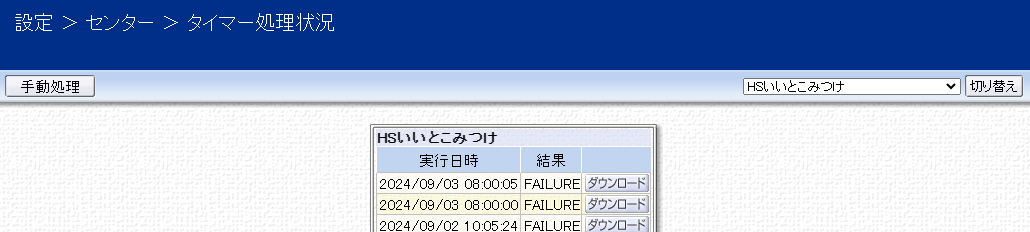
- 代码
- 前端:center/timer_service/index.jsp
- java:
- 手动执行:TimerServicePageController.run
方案一:尝试 V4 能否直接调用 V3 的方法
-
找下之前是否有这样的例子
- 没找到
-
目前 v3 和 v4 之间的交互有哪些?
- v3 跳转 v4,先登出 v3,再登录 v4
- WebContent/common/c4v4_transition/toppage.xhtml
- C4v4TransitionToppagePageController.executeLink
- v4 跳转 v3,先登出 v4,再登录 v3
- hamburger.xhtml -> c4th.logoutToV3
- LogoutToV3Servlet
- v3 跳转 v4,先登出 v3,再登录 v4
方案二:尝试在 V4 中,将 V3 的代码拷过去
- 是只需要拷贝业务代码,还是定时器的代码也要拷贝过去
方案三:在 V3 新增一个接口,在 V4 中尝试调用
- 定义接口的几种注解
- @Path,restful 接口
- @WebService,webservice 接口
- 其他几种注解
- @WebServlet
#12043 (センター>タイマー処理状況 改良(タイマー手動停止時の再開タイミング変更)) – C4th Project (educom.co.jp)
使用方案三
存在的问题
- 如果在 v4 停止某一个定时任务,payara5 重启时,这个任务还是会启动。